How we made our models serve +79% faster on Intel GPUs
Our two Intel Arc Pro B60 cards serve Qwen3.6 35B-A3B. Most of each step was being spent in Python on the server's processor, not on the cards. The engine now records the model's computation once and replays it: with two requests on a card, each one gets 64 tokens a second instead of 36, with four 55 instead of 35, and with eight 44 instead of 35, on the same hardware.
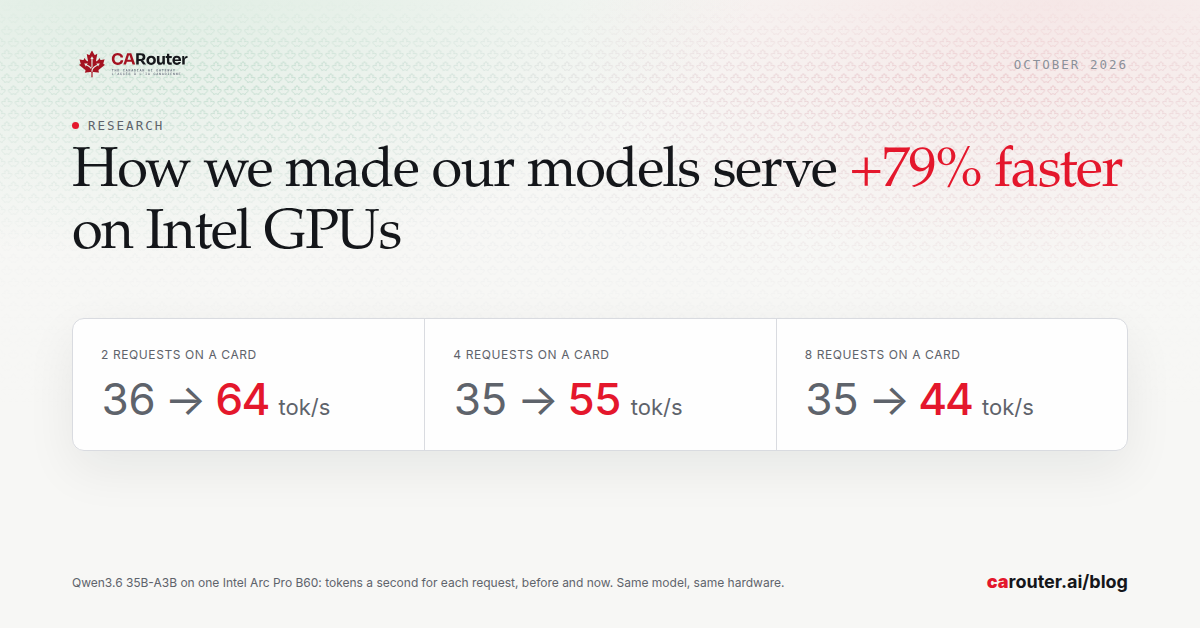
CARouter Cloud serves Qwen3.6 35B-A3B on two Intel Arc Pro B60 graphics cards in Ottawa, beside its GB10. The same cards now write up to 79% more tokens a second for each request.
The hardware, the model and its 4-bit form did not change. The time was being lost on the server's processor, not on the cards.
The article that introduced this server: Qwen3.6 35B-A3B on two Intel Arc Pro B60 cards.
The short version
- What a client sees. With two requests on a card, each one gets 64 tokens a second instead of 36. With four, 55 instead of 35. With eight, 44 instead of 35. Alone, 72 instead of 60.
- What we changed. The engine now records the model's computation once and replays it. Before, it ran every step through Python.
- What stood in the way. Two logging calls in Intel's build of vLLM. We remove them when we build our own image.
- How we tested it. 450 prompts in both modes, a tool call, a reasoning question, and prompts of 29 000 and 101 000 tokens.
- What it costs. A longer first start, and about 6% less room for the prompts the engine keeps in memory.
Where the time of a request goes
Our engines count what they do. Writing the answer is about nine tenths of the time a request takes, and a card usually writes for about two requests at once.
That is where this server was weakest. One request alone got 60 tokens a second. From two to eight requests on a card, each got about 35.
The card was waiting for Python
Our first article on this server noted that one processor thread paces each engine. This time we looked at what that thread does.
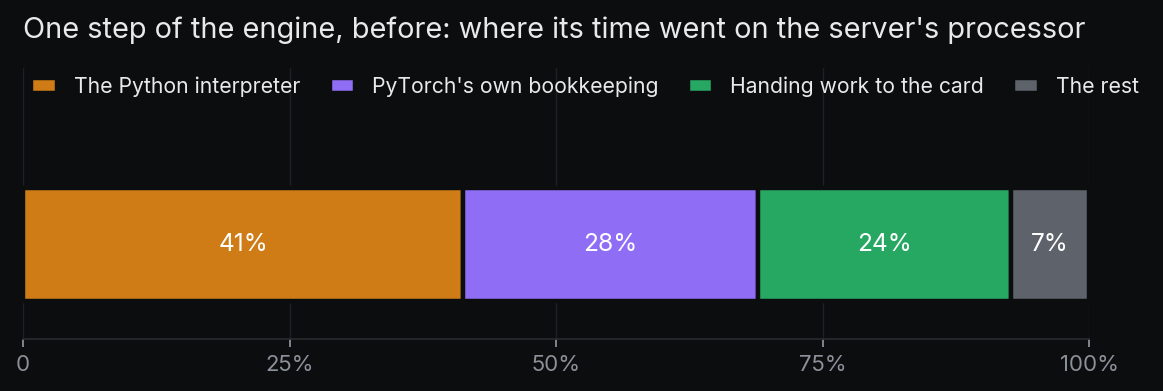
About 70% of each step went to the Python interpreter and to PyTorch's own bookkeeping, on that one thread. About a quarter went to handing work to the card. The card itself had time to spare.
That explains the flat 35. Most of a step's cost was fixed, whatever the number of requests.
Record once, then replay
vLLM can record the model's computation once, as a graph, and replay it at every step. The replay skips most of the Python work.
Intel's build of vLLM ships with that mode off, and for this model it did not start. The cause was small: two logging calls sit in code that PyTorch's compiler has to follow, and the compiler stops on them.
We remove those two calls when we build our own image. The problem, as reported to Intel.
What we measured
Same card, same day, in both modes, while the other card served customers.
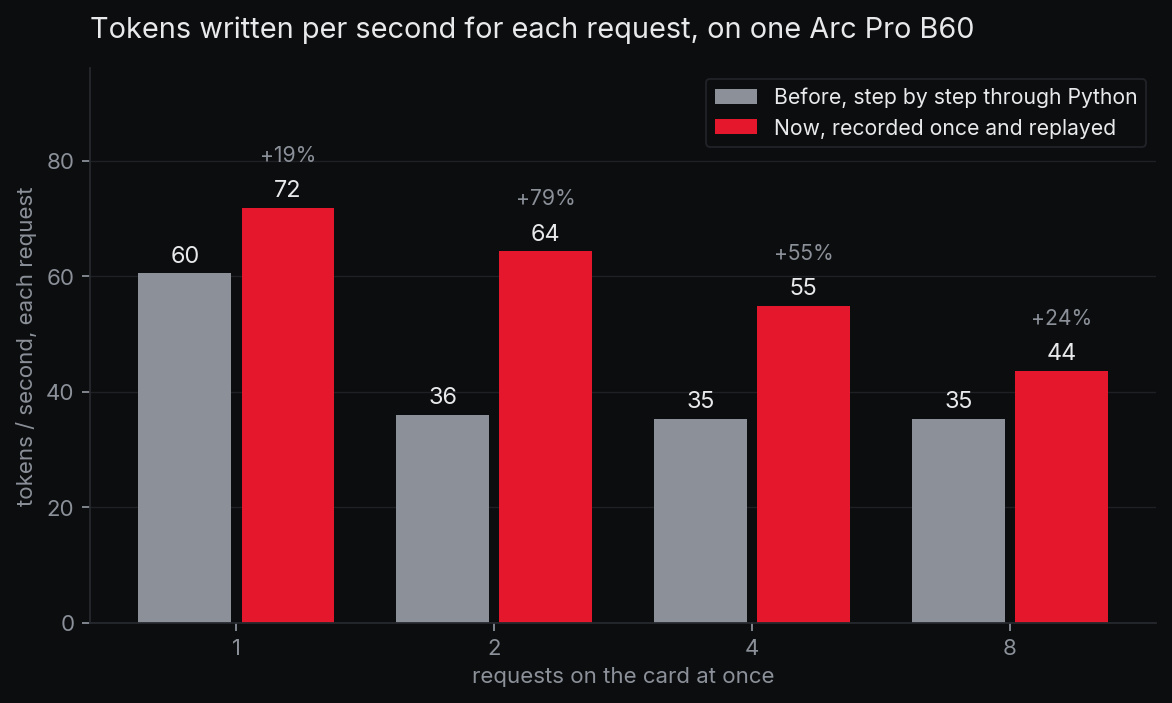
With two requests on a card, each one gets 64 tokens a second instead of 36, which is 79% more. With four it is 55 instead of 35, and with eight 44 instead of 35. One request alone gets 72 instead of 60.
In total, one card writes 129 tokens a second with two requests instead of 72, and 349 with eight instead of 282. Reading a prompt is as fast as before, about 5 900 tokens a second.
The model's built-in helper, which did not pay on this server, now does for one or two requests: 111 and 88 tokens a second each. From four requests it is slower than without it, so it stays off.
What we checked before serving it
Intel describes this mode as not yet supported in that build. So we did not take the speed on trust.
We sent 450 different prompts to both modes and counted the answers that contain a long run of one repeated character, a known sign of trouble. There were 3 in each mode, all of them lines drawn in a table.
A tool call, a reasoning question, and a fact hidden in prompts of 29 000 and 101 000 tokens came back right in both modes. A sample of this size would show a frequent fault, not a rare one.
We then switched one card at a time, with its traffic moved to the other card first.
What it costs
The engine takes about twice as long to start the first time, because it prepares the graphs, and it keeps them for the next start.
It also leaves about 6% less room for the prompts it keeps in memory.
On a small card, the first thing to profile is the processor beside it.